


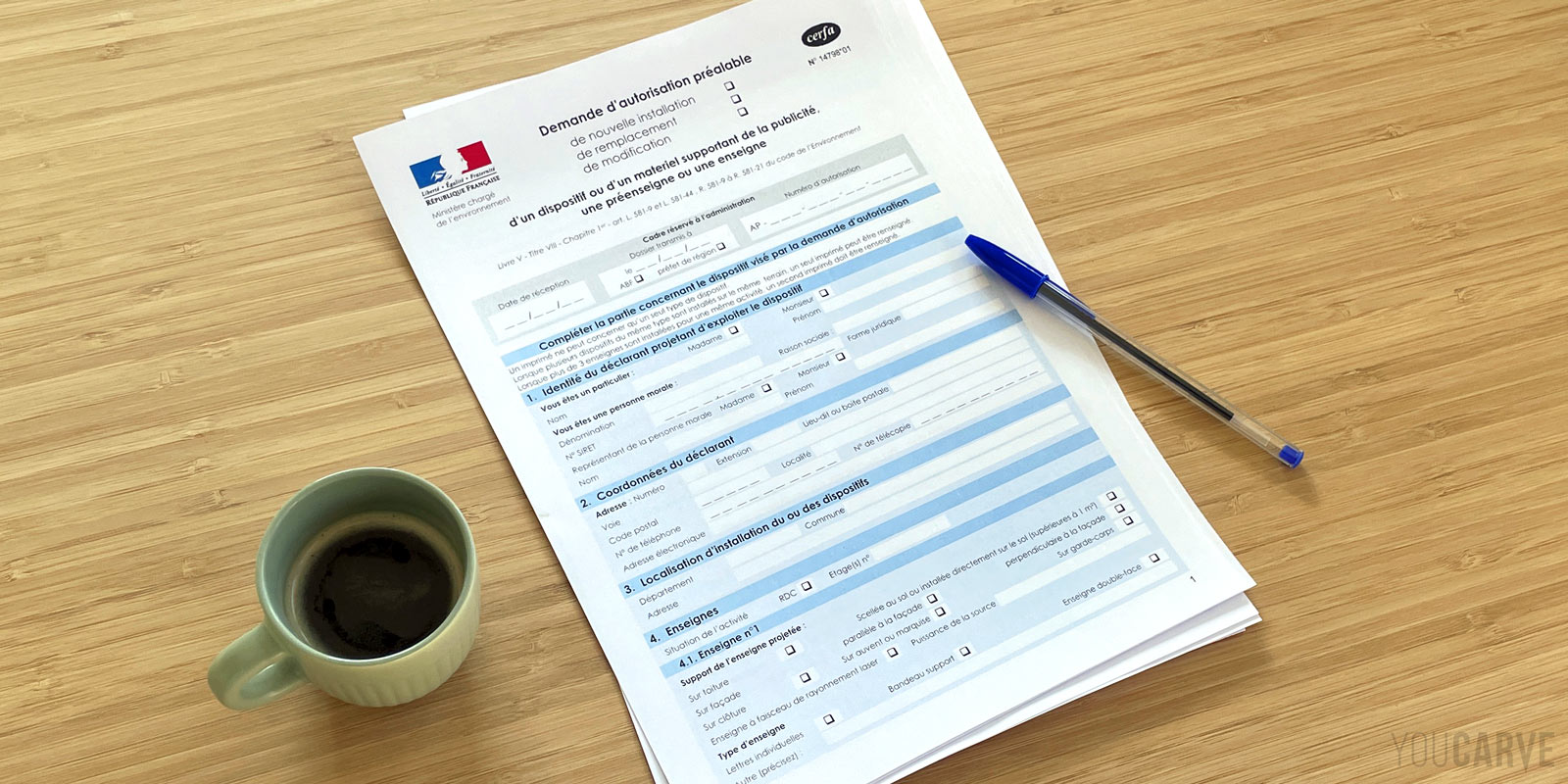
Starting a business is a great adventure. After months of preparation (business plan, searching for premises, financing, interior design...), the opening of your shop is finally approaching. Among the last elements to finalize is your sign: one of the first things your future customers will see. But before creating your sign, an administrative step is required: the authorization request. This formality should not be taken lightly. Poorly anticipated, it can quickly become time-consuming, and an incomplete file can lengthen delays or complicate the acceptance of the project.
In this article, we will explain how it works and simplify the process for you by presenting the steps to follow, the documents to prepare, points of vigilance, and tips to encourage the acceptance of your signage file.
Disclaimer - This post is a translation of an original French article about signage permit applications in France. The information provided applies exclusively to French regulations and is only relevant if you are planning to install a sign on French territory.
Summary :
- Administrative basics to know for a signage project
- Identifying the right contact and asking the right questions
- Compiling your signage authorization request file
- The Cerfa 14798 form
- Supporting documents for the signage authorization file
- How to send your file?
- Deadlines for a signage authorization request file
- Acceptance of the file
- Refusal of the file
- Summary and recap
1 – Administrative basics to know for a signage project
RNP? RLP, RLPi? What are they?
RNP stands for Règlement National de Publicité (National Advertising Regulation). It is the legal text that generally governs outdoor displays (which include signs) in France.
RLP stands for Règlement Local de Publicité (Local Advertising Regulation). It is a document that each municipality can draft to specify its own rules (technical, aesthetic, safety) regarding signs and advertising displays. These rules can therefore vary from one municipality to another.
RLPi stands for Règlement local de publicité intercommunal (Intermunicipal Local Advertising Regulation). De more and more municipalities are choosing to develop local regulations together. The RLPi thus corresponds to an RLP implemented on an intermunicipal scale.
In municipalities that do not have local regulations (RLP or RLPi), the national regulation (RNP) applies.
Why RNP and RLPs?
Imagine if there were no framework for signs and outdoor displays: the urban landscape would turn into a permanent bidding war, with everyone wanting the largest, brightest sign, without any coherence.
The RNP and RLPs serve to harmonize the installation rules for advertisements and signs on French territory. They aim to protect the living environment and the environment by setting standards for density, format, and location, particularly in protected urban sectors, historical heritage zones, or particularly touristy sites (for example, a village with medieval buildings). The objective: to prevent the urban landscape from being disfigured by overly garish signs, and to ensure aesthetic coherence by framing, for example, authorized materials or technical solutions
Where to consult the RNP or RLP?
Do I absolutely have to read them before considering my sign?
Given all the steps you have to take as a merchant, you certainly won't have time to read these regulations in their entirety. We advise you, however, to find out at least about the part of the regulation that applies to your project, in order to identify the rules likely to concern your project and to be able to anticipate them.
The RNP is notably integrated into the Practical guide to outdoor advertising (starting from p. 30), published by the Direction générale de l'aménagement du territoire.
Regarding RLP and RLPi, more and more municipalities are making them available on their website for consultation or download.
Here are some examples:
- RLP of the city of Carcassonne
- RLP of the La Rochelle urban area
- RLPi of the Grenoble urban area
- RLPi of the Montpellier urban area
Is it mandatory to have authorization to install your sign?
Can I make my request after having installed my sign?
Installing a sign without having obtained prior authorization can lead to fines, or even the removal of the sign if it is deemed non-compliant by the municipality. It is therefore strongly discouraged to install the sign without having obtained authorization.
In some cases, it is possible to regularize the situation after the fact, but it is an uncertain process that may force you to modify, or even remove, the sign if it is not compliant.
And what is the TLPE?
Another acronym often comes up when talking about signs: TLPE : it stands for Taxe Locale sur la Publicité Extérieure (Local Tax on Outdoor Advertising).
It is not a document per se but a tax that some municipalities choose to charge businesses, and therefore shops, that display advertising (including signs). This tax is calculated based on the surface area of the sign and the size of the municipality (in number of inhabitants) where it is installed.
Good to know: the TLPE applies in municipalities that have instituted the tax, but some decide not to establish it.
In itself, the TLPE does not intervene in the authorization request. It is, however, wise to take an interest in it from the start in order to know if your sign will generate a tax and how much it will cost you.
2 - Identifying the right contact and asking the right questions
Gathering information on the service in charge of signage authorizations
The first question to ask yourself is:
« Who manages signage authorizations in my municipality? »
To answer this, your first point of contact will be your town hall (mairie). Even if it may seem obvious, let's clarify that it is the town hall where your shop is located, not the one where you are domiciled. Note: for large cities, it is increasingly common for the city's website to have a section dedicated to signs and outdoor advertising.
First of all, we recommend that you call the town hall of the municipality where your shop is located and ask the following question:
« I would like to file a signage authorization request for my business in your municipality. Which service should I contact? »
In most cases, it will be the urban planning department (service urbanisme) of the town hall. In other cases where the municipality is attached to a group of municipalities, it may be a dedicated service of the Community of Municipalities. In any case, take maximum notes regarding the service in charge of signage authorizations:
- Name of the service
- Name of the main contact or manager, if there is a specific person
- Phone number/email address of the service or person (so you don't have to go through the switchboard every time if you have questions)
- Postal address of the service, for sending your file by mail
Collecting information on the Advertising Regulation
Even if you have already retrieved information from the town hall website, it is a good thing to introduce yourself to the service that will study your file and exchange verbally on their operation. From there, we recommend that you directly contact the service or person in charge of authorization requests and ask the following questions:
« Is the municipality equipped with a Local Advertising Regulation (RLP)? » and if so, « Where can I consult it? »
The RLP is very often available online on the town hall website, or you will be offered to have it sent by email.
« What is the occupation rate of the commercial surface? »
This question is optional, but if you have a project with a large sign area, this info will allow you to anticipate and check that you are within the limits before sending your request. Indeed, the area of signs on a facade generally must not exceed a certain rate of the facade area. This is the occupation rate and it is generally around 15%.
« In which zone of the RLP is my business located? Is it in a listed zone or a protected perimeter? »
The types of protections/motifs/situations to check are: the surroundings of historical monuments (500 m perimeter or delimited perimeter), remarkable heritage sites (SPR), sites classified or registered under the Environmental Code, and any prescriptions of the PLU or RLP.
It is theoretically possible to obtain this information on your own, by searching the zoning plan in the RLP, or by consulting the address of your premises on the site of the Atlas of Heritage of the Ministry of Culture, or by checking the PLU (Local Urban Plan) via the Géoportail urban planning website. But the simplest and safest way is to contact the urban planning department of your town hall, which will be able to orient you quickly from the exact address of your shop. The goal is to quickly determine if special prescriptions apply to your sign. Note all the information obtained: it will be useful when filling out the authorization request form.
Note: if your shop is indeed in a listed zone, the rules are more restrictive, authorization is subject to the opinion of an Architect of the Buildings of France (Architecte des Bâtiments de France), and the processing time is often longer. Before sending your file, take the initiative to consult the Departmental Unit of Architecture and Heritage (UDAP) of your department, which will be able to inform you of the precise constraints (dimensions, materials, colors...) We will not go into more detail about listed zones in this article, as the subject itself could be the subject of a complete file.
Also inquire about the TLPE
Last question, optional, but as mentioned above, we also encourage you to address the subject of the Local Tax on Advertising and Signs (TLPE)
« Does the municipality apply a TLPE? » and if so « What are the rates and conditions? »
This will allow you to anticipate the eventual cost of this tax in your project.
Once you have gathered all this information, you can move on to the preparation of your file.
3 – Compiling your signage authorization request file
What does an authorization request file consist of?
- The Cerfa 14798 form (prior authorization request for a sign, pre-sign, or advertising device) of which we will detail the different sections and fields just after
- Several supporting documents, which we will also detail
- A cover letter (not mandatory but recommended)
Since November 28, 2023, the French administration has offered three new forms as an alternative to Cerfa 14798 : Cerfa 16308, which specifically concerns requests for prior authorization of signs (APE), while the other two (Cerfa 16309 and Cerfa 16310) are dedicated to pre-signs and advertising devices.
Nevertheless, the Cerfa 14798 form remains today the one featured on the public services website and remains predominantly used by municipalities. We will therefore base ourselves on this one in this article.
In case your town hall has opted for the Cerfa 16308 form, rest assured the principle and the sections have remained overall similar, and some parts have even been simplified.
Example of a signage project
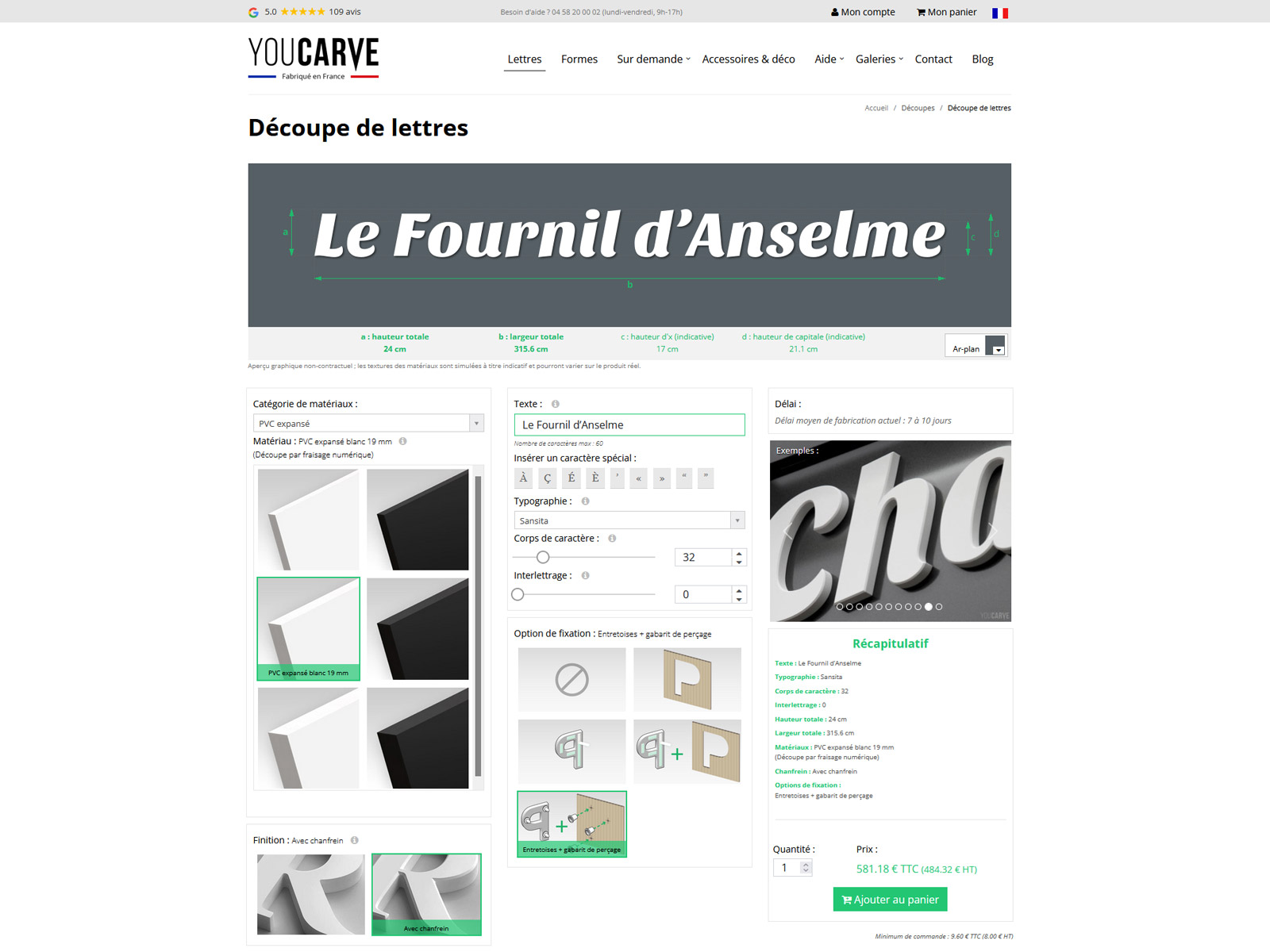
Lettering parameters on our cutting configurator
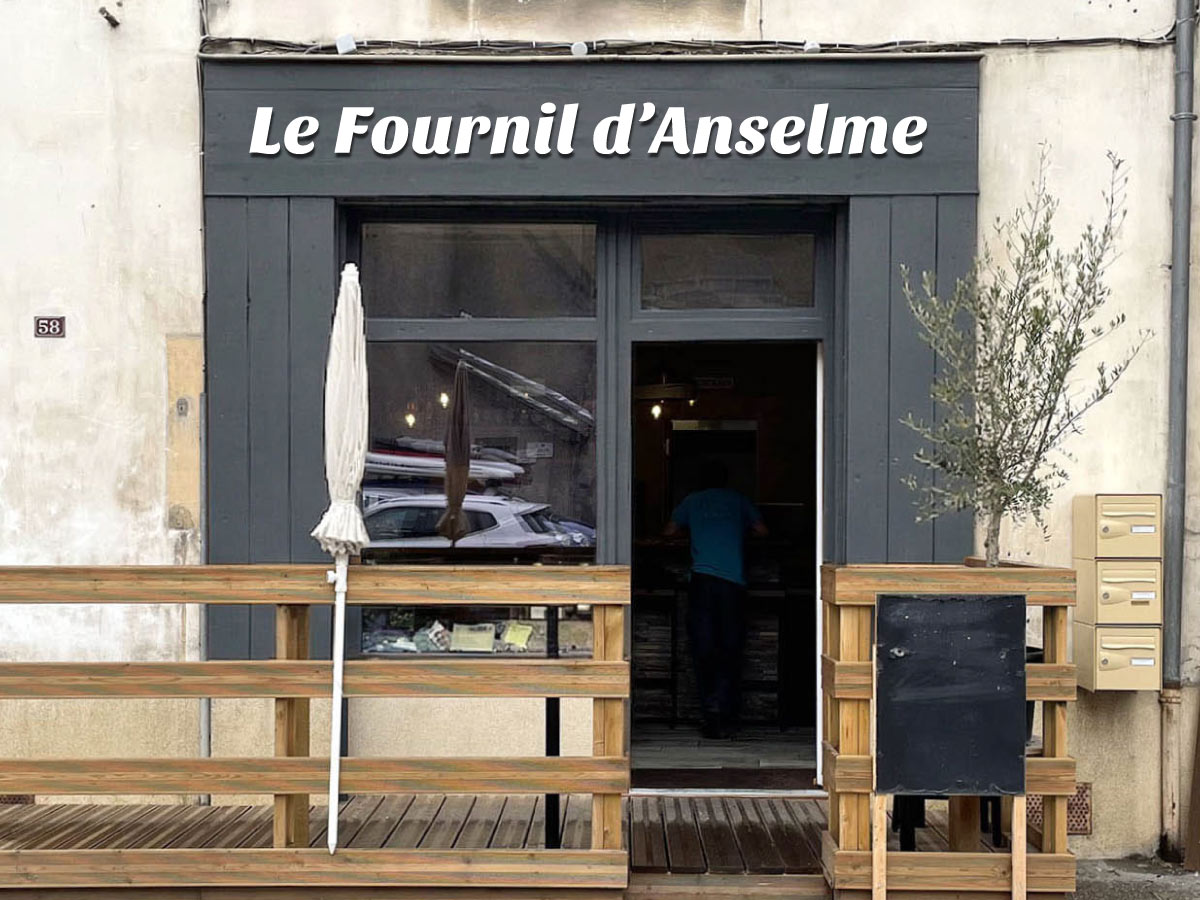
Simulation (photo insertion) of the lettering on the facade
For the purposes of this article, we will take as an example a fictional business project with a simple sign, composed of letters cut in relief. It is a bakery, "Le Fournil d'Anselme", whose sign will be made of letters cut from 19 mm thick white expanded PVC, which will be fixed directly on the facade fascia using snap-on spacers.
In the following parts, we will detail, step by step, the constitution of an authorization request file based on this example. We will see how to fill out the Cerfa 14798 form and prepare the associated supporting documents. If you are planning a relief cut letter sign, this example will offer you a nearly ready-to-use base.
4 - The Cerfa 14798 form
The Cerfa 14798 form is downloadable directly from the service public website :
Download the blank Cerfa 14798 form in PDF format
The Cerfa 14798 form is several pages long and can be intimidating at first, but rest assured, many sections will be optional. Section by section, we will see how to complete the different fields of the form in a general way, while specifying, for each of them, how to fill them out in the context of our fictional sign project "Le Fournil d'Anselme".
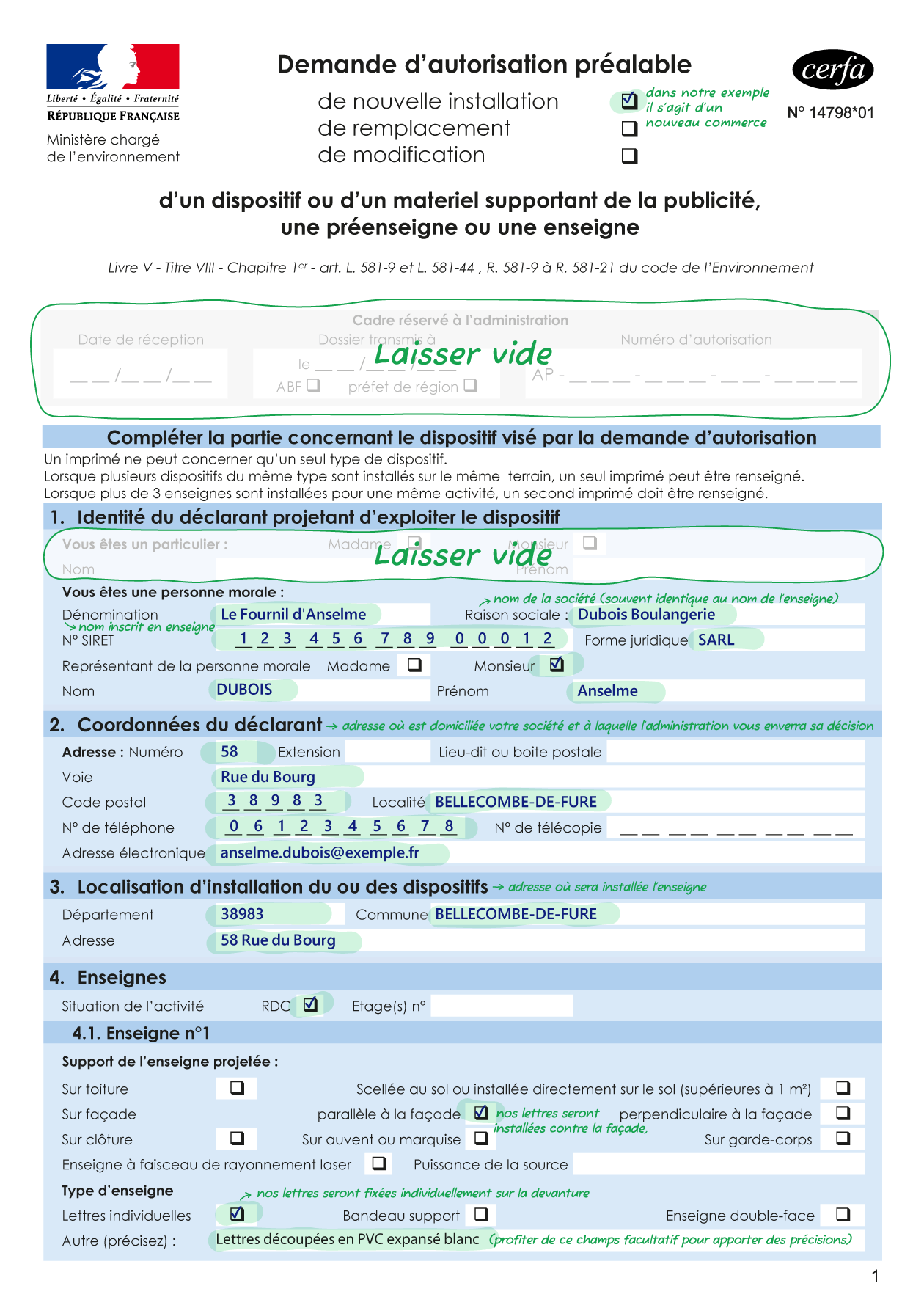
Cerfa 14798 page 1
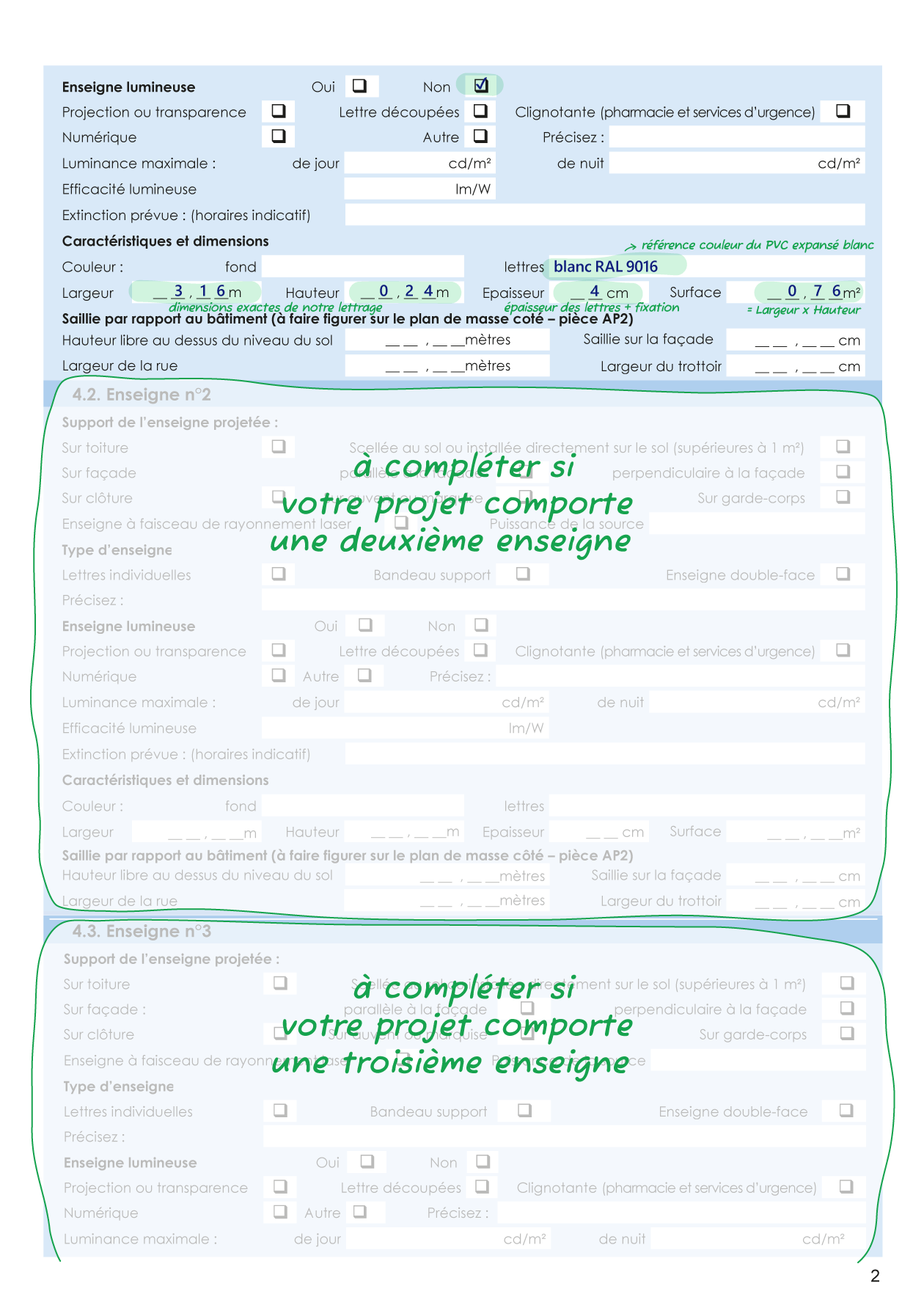
Cerfa 14798 page 2
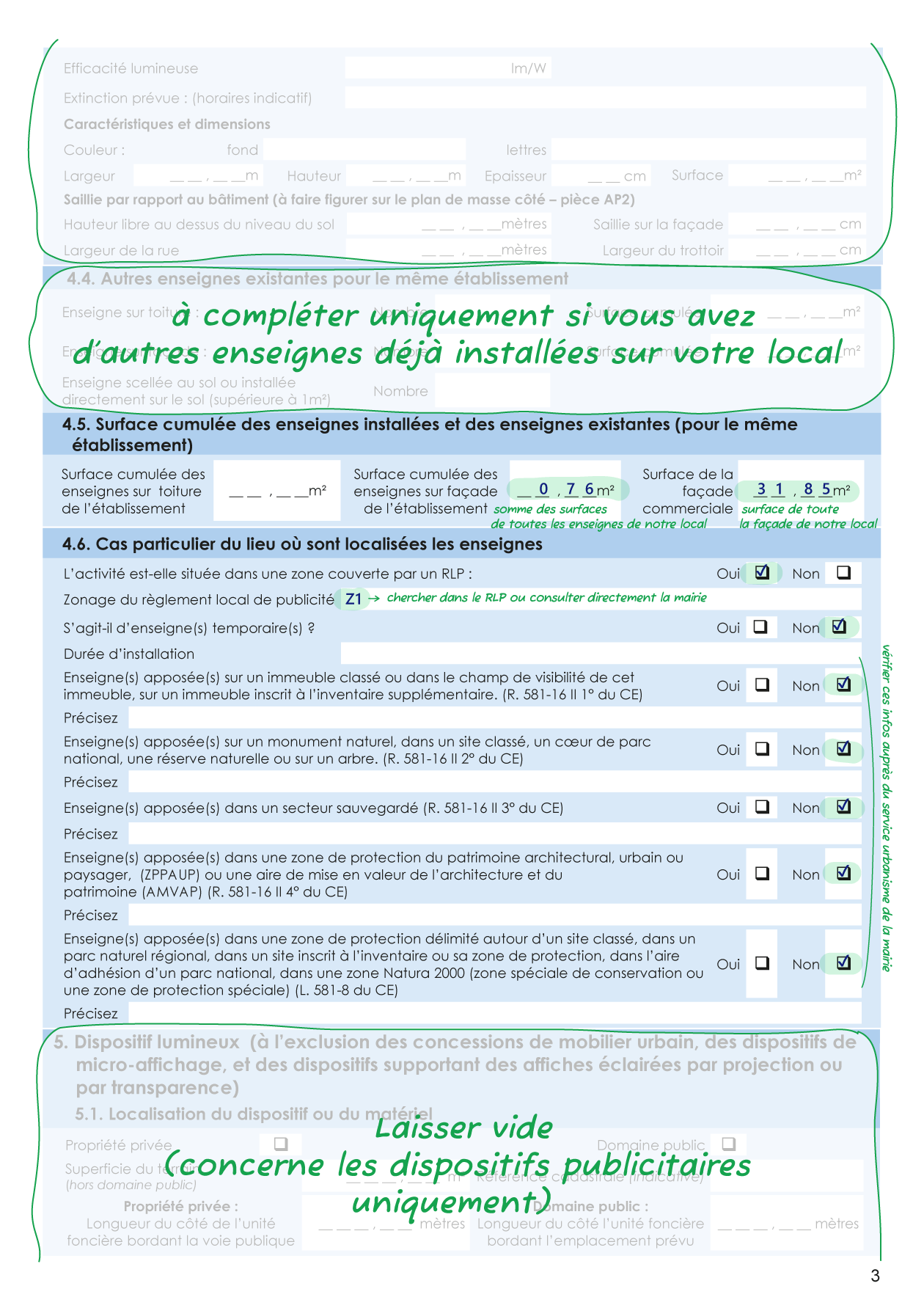
Cerfa 14798 page 3
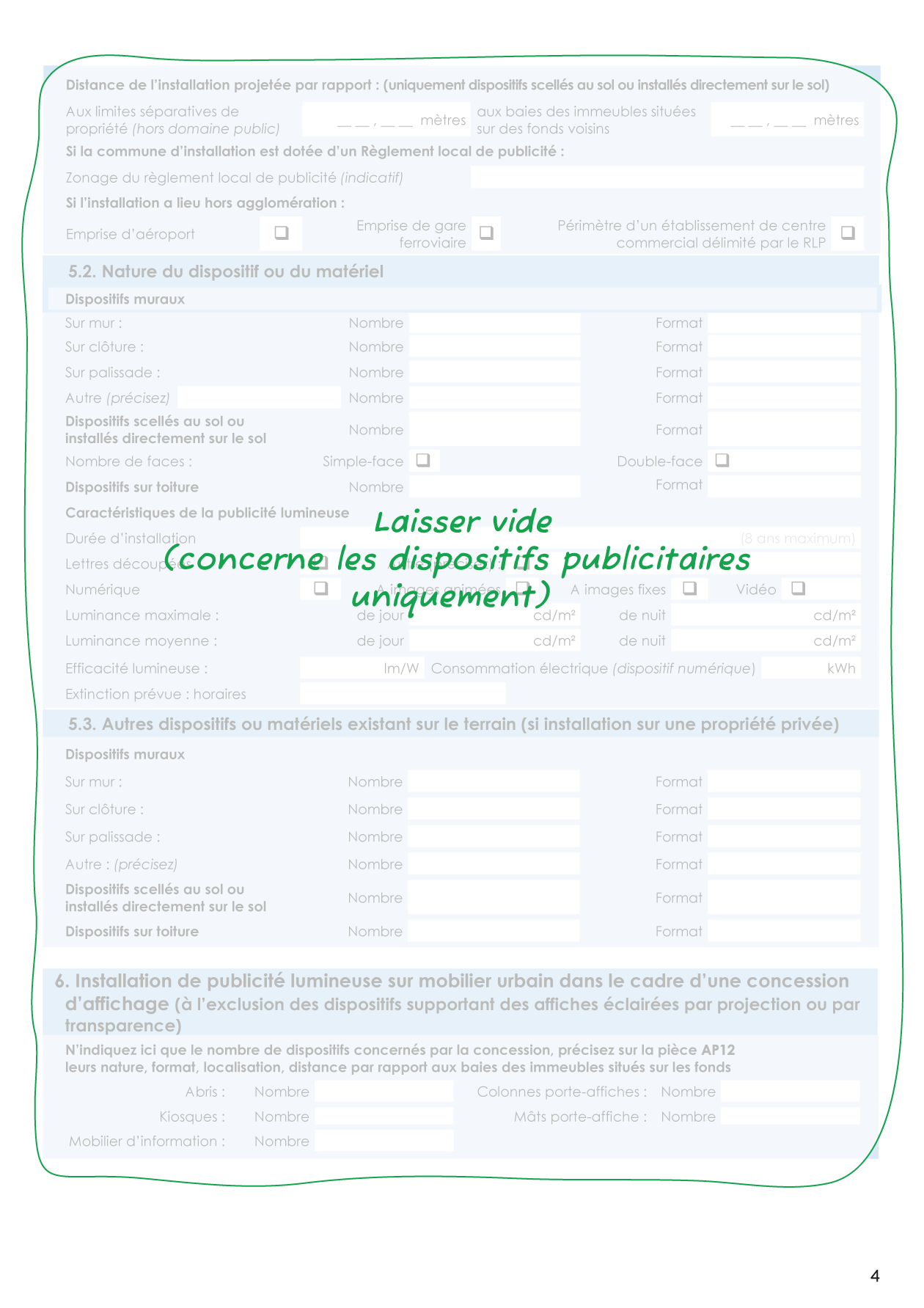
Cerfa 14798 page 4
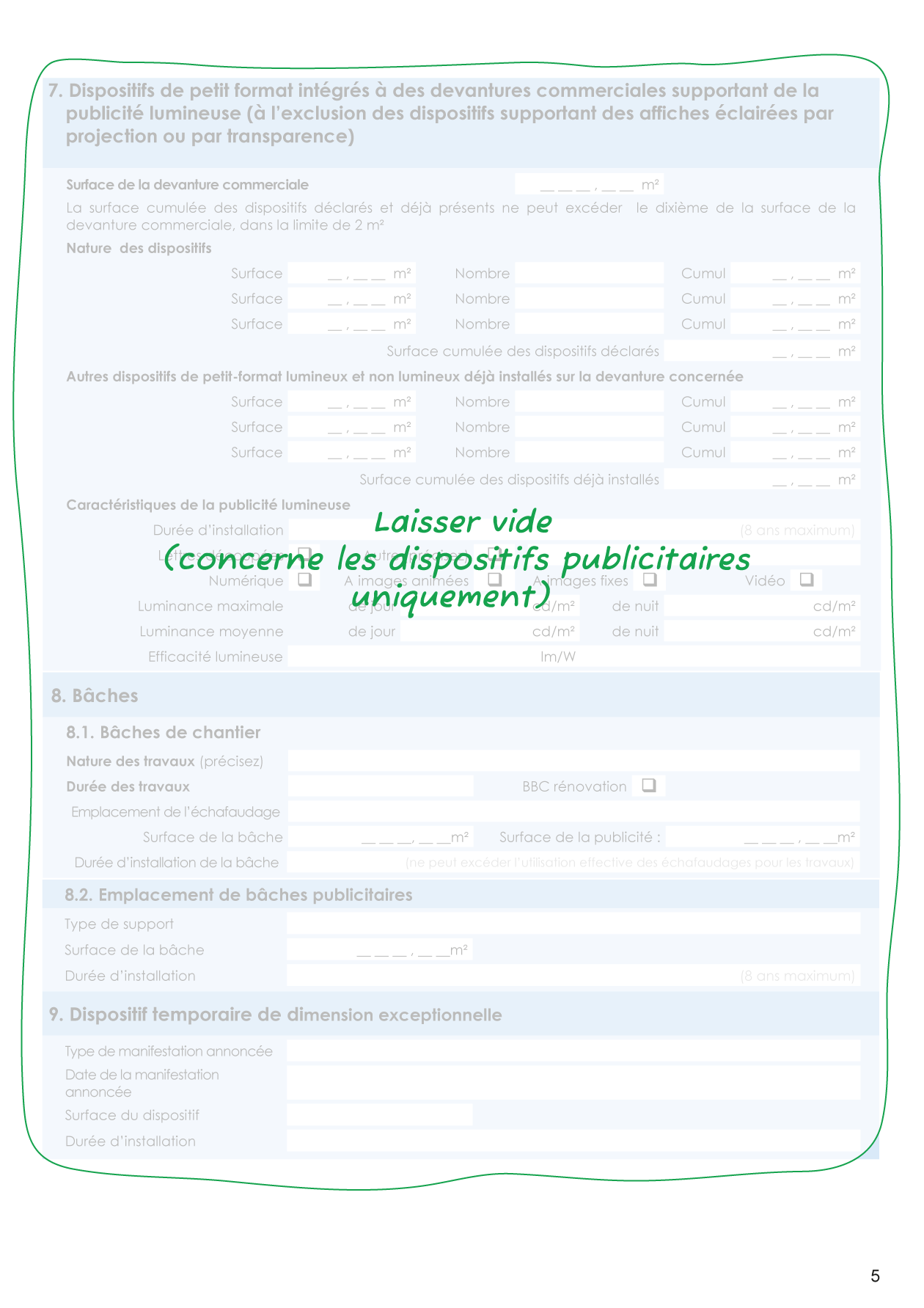
Cerfa 14798 page 5
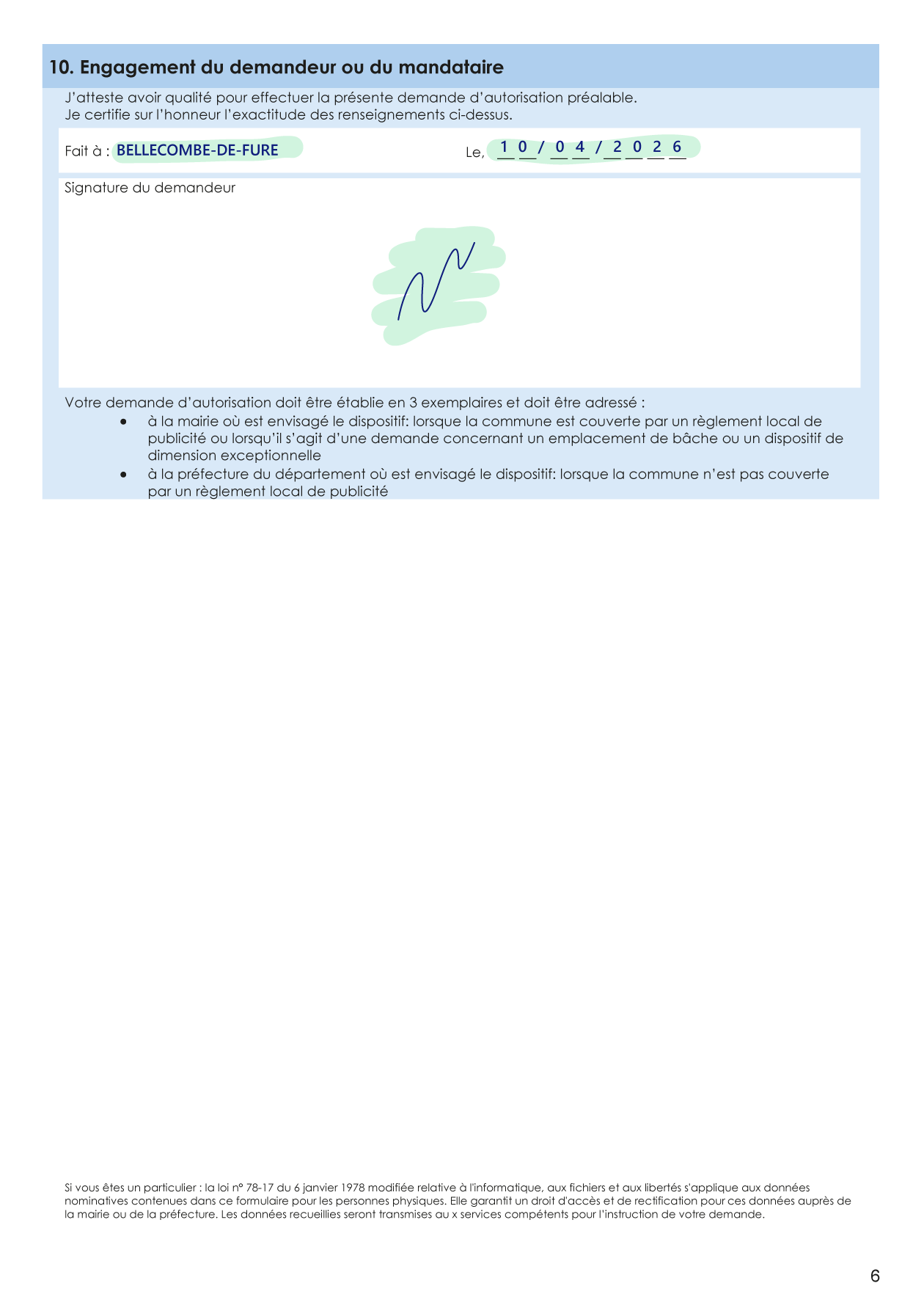
Cerfa 14798 page 6
Header on the first page
We start at the very top of the first page, where you will need to check one of the three boxes:
- New installation : if this is the first time you are installing your sign. Understand by this that you are starting your new activity at this location, as a new tenant.
- Replacement : if you are already installed and already practicing your activity in these premises, and you wish to change the existing sign for a totally different one.
- Modification : if you are already installed and already practicing your activity in these premises, and on the basis of the current sign, you wish to change only one or more elements (ex: color, part of the letters, etc.).
Section 1 - Identity of the declarant
As a business you are a company, so you will leave blank the lines intended for individuals.
- Trade name (Dénomination) : this is the name by which you will make yourself known, and which will logically be written on your sign
- Company name (Raison sociale) : it is the name of your company as it was legally registered. Very often the trade name and company name are identical, but you have the right to give a different name to your activity from that of your company. If you are in individual business status, indicate your Last Name + First Name + « EI » SIRET No.: the SIRET number of your company
- Legal form : it is the status of your company: SARL, EURL, EI…
- Representative of the legal person : your Last Name and your First Name.
Section 2 - Contact details of the declarant
Indicate here the address at which you have registered your company, and to which the administration will send its decision.
Note: it is common for this to be the same as your shop's premises, but in some cases you may have registered your company headquarters at another address for administrative reasons.
Recommendation: complete your phone number and your email well to facilitate exchanges with the administration.
Section 3 - Location of installation of the device(s)
This is the address of the premises where the sign will be installed.
Section 4 - Signs
We start by specifying at what level of the building the shop is located: ground floor or upper floor.
For the rest, the form provides three sub-sections allowing you to declare up to three signage devices for your premises. For example, your shop is on a street corner with two facades, and you plan a sign fascia on each of them as well as a perpendicular panel (called a "flag sign") on the corner. That will make 3 signs to declare.
Note 1: if your project involves more than 3 signs, you must then fill out a second form to describe the additional signs. In this case, you will take care: to copy sections 1, 2, 3 (identity, coordinates, location) identically, to report in section 4.4 of each form the signs described in the other, and to indicate in section 4.5 the cumulative area of the whole.
Note 2: if you plan window graphics (adhesive lettering or decoration on glass, for example to indicate your hours or services), its treatment depends on its location. Placed on the outside, it is considered a sign and must therefore be integrated into your authorization request and counted in the cumulative signage area. Placed on the inside, it generally falls under interior layout and can therefore escape prior authorization as well as the TLPE. But beware: if this solution is used as the sole sign for the manifest purpose of avoiding regulation, the administration may reclassify the device as a sign. If in doubt, it is better to check the RLP provisions of your municipality.
4.1 / 4.2 / 4.3 – Sign n°1 / n°2 / n°3
For each sign there are the same sections:
Support for the projected sign:
- On roof : The sign is fixed on the roof of the building.
- Sealed to the ground or installed directly on the ground : the sign is separate from the building and placed on the ground (ex: totem, panel on legs…)
- On facade - parallel to the facade : the sign is fixed against the wall, in the same plane as the facade (fascia, glued letters…)
- On facade - perpendicular to the facade : sign called "flag", which projects from the wall and is read perpendicular to the street.
- On fence : the sign is fixed on a fence wall or an enclosure mesh.
- On awning or canopy : the sign is placed on an awning or a folding arm awning.
- On railing : the sign is fixed to a balcony railing.
- Sign with laser radiation beam : very specific case of a sign sometimes used by discotheques.
Our letters being right on the facade, we check On facade - parallel to the facade.
Type of sign:
- Individual letters : each letter of the sign is a separate element fixed directly on the wall or facade.
- Support fascia : rectangular panel (plate, box) on which the text and/or logo are printed or applied.
- Double-sided sign : visible from both sides, to be chosen for a sign perpendicular to the facade (flag sign).
- Specify : to add any additional precision likely to describe the sign or if none of the previous categories correspond.
We are going to fix our letters directly on the front of the building, so we check "Individual letters".
Note: if we had added a panel in the background to create a rectangular colored background on which to put our letters, then this panel would have been part of the sign and we would have checked "support fascia" by specifying: « panel with cut-out letters in white PVC ».
Illuminated sign
- Yes / No : Indicate if the sign is lit or emits light.
If yes, specify the type of lighting:
- Projection or transparency : Light projected onto the sign (spotlight) or passing through a translucent material (backlit box).
- Cut-out letters : Individual illuminated letters (LED on front face or halo backlighting).
- Flashing : Reserved for pharmacies (green cross) and emergency services.
- Digital : LED screen, digital display (electronically modifiable content).
- Other : if none of the previous categories correspond.
- Maximum luminances and Luminous efficiency : these are data you can obtain from the sign manufacturer. If you do not know them, it is best to leave these fields blank. These are technical data that are difficult to evaluate, and there is little chance they will be requested of you
- Planned extinction : as a general rule, signs must be switched off between 1 AM and 6 AM (except for night activities).
For our project, the letters are not illuminated and we therefore check No
Characteristics and dimensions
Note: on an authorization request, you don't declare what is already present, you declare what you are adding, or modifying.
The first two fields concern the color. You will describe the shade here with if possible a color chart reference (example: pastel blue RAL 5024, olive green Pantone 16-0847) or possibly the material (example: larch wood natural shade, anodized aluminum...)
- Background (Fond) : to be completed only in the case of a support fascia.
- Letters : the color or material of your letters fixed directly to the facade or on the support fascia.
In our example, the letters are in white RAL 9016.
- Width and Height : indicate the dimensions of your panel if you are adding a support or the dimensions of your lettering if you are fixing them directly to the facade. In our case the total dimensions of our lettering are 3.16 m wide by 0.24 m high
- Thickness : the thickness of your entire sign. In our example we have letters of 1.9 cm + a fixing that spaces them from the wall by 1.6 cm, i.e., 3.5 cm thick. We will therefore indicate the value rounded to 4 cm
- Surface : multiply the width by the height indicated before and you get 3.16 m x 0.24 m= 0.76 m²
Projection relative to the building (Saillie)
These fields are to be completed only for a "flag" sign, i.e., a panel installed perpendicular to the facade.
- Projection relative to the building : corresponds to the distance between the wall and the outer edge of the sign.
- Free height above the ground : Distance between the bottom of the sign and the ground: above a sidewalk, the minimum free height is generally 2.50 m
- Street width / Sidewalk width : these data will be used in calculating the maximum authorized projection for your sign.
For a flag sign, which is a type of device often very regulated, it is once again strongly recommended to check the RLP provisions of the municipality before finalizing its project.
4.4. Other existing signs
If you already have other signs (belonging to you) installed on your premises, they must be indicated in this part.
4.5. Cumulative surface area of signs
- Cumulative area of signs on roof / Cumulative area of signs on facade : calculate and indicate the total area of all signs (new + existing) for your establishment.
- Commercial surface : this is all the usable surface of your storefront. It is not the floor area of the premises but indeed its facade surface, visible from the street.
These figures will allow the administration to check compliance with regulatory thresholds. If you want to check that you are within the rules, calculate the ratio between your cumulative surface and your commercial surface. The percentage obtained must be less than the occupation rate of the commercial surface mentioned a little higher up.
In our case: (Sign surface / Facade surface) x 100 = (0.76 / 31.85) x 100 = 2.4 %. We are therefore well below 15 %.
4.6. Special case of the location where the signs are located
Start by indicating if you depend on an RLP.
If yes, the map of your locality is certainly divided into zones. In the following line it will be necessary to indicate the reference of this zone. During your exchange with your town hall (see above) you have normally already obtained this info. Otherwise, consult the RLP or RLPi of your municipality, and search for the "Zoning Plan" or "Zone Map" section to locate the address of your building, and thus determine the zone (the denominations are unique to each RLP, but are often of the form « ZE » or « ZP » followed by a number).
If your sign is temporary, specify it in the following line indicating the duration.
For all the following boxes you have normally already obtained the information from your town hall. We will not develop all the scenarios of the different types of zones or sectors in this article. If you have a doubt or are missing info on this subject, we recommend that you recontact the urban planning department of your town hall to take advice from them.
Sections 5, 6, 7, 8 and 9
These sections concern advertising devices and not signs, so you can ignore them.
Section 10 - Commitment of the applicant or mandatory
Indicate your city, date, and sign (if you completed the PDF document directly on a computer, you will sign after having printed it).
The following pages of the form summarize the list of potential supporting documents (which we will explain in the next part), various information, and the last page is a deposit receipt template to use potentially at the time of submitting your file.
5 - Supporting documents for the signage authorization file
These are various documents to prepare and attach to your file to provide clarifications.
These documents are not all mandatory. Here are the main ones:
AP1 : Site location plan
For this plan, you can simply take a screenshot after searching for the address on a mapping site like Google Maps or one of the alternatives such as Mapy or Open Street Map which, besides being more respectful of privacy, also offer a clearer visualization of buildings and roads.
Integrate this capture into your document, indicating the building's location clearly (with a circle, for example), and reminding the address next to it.
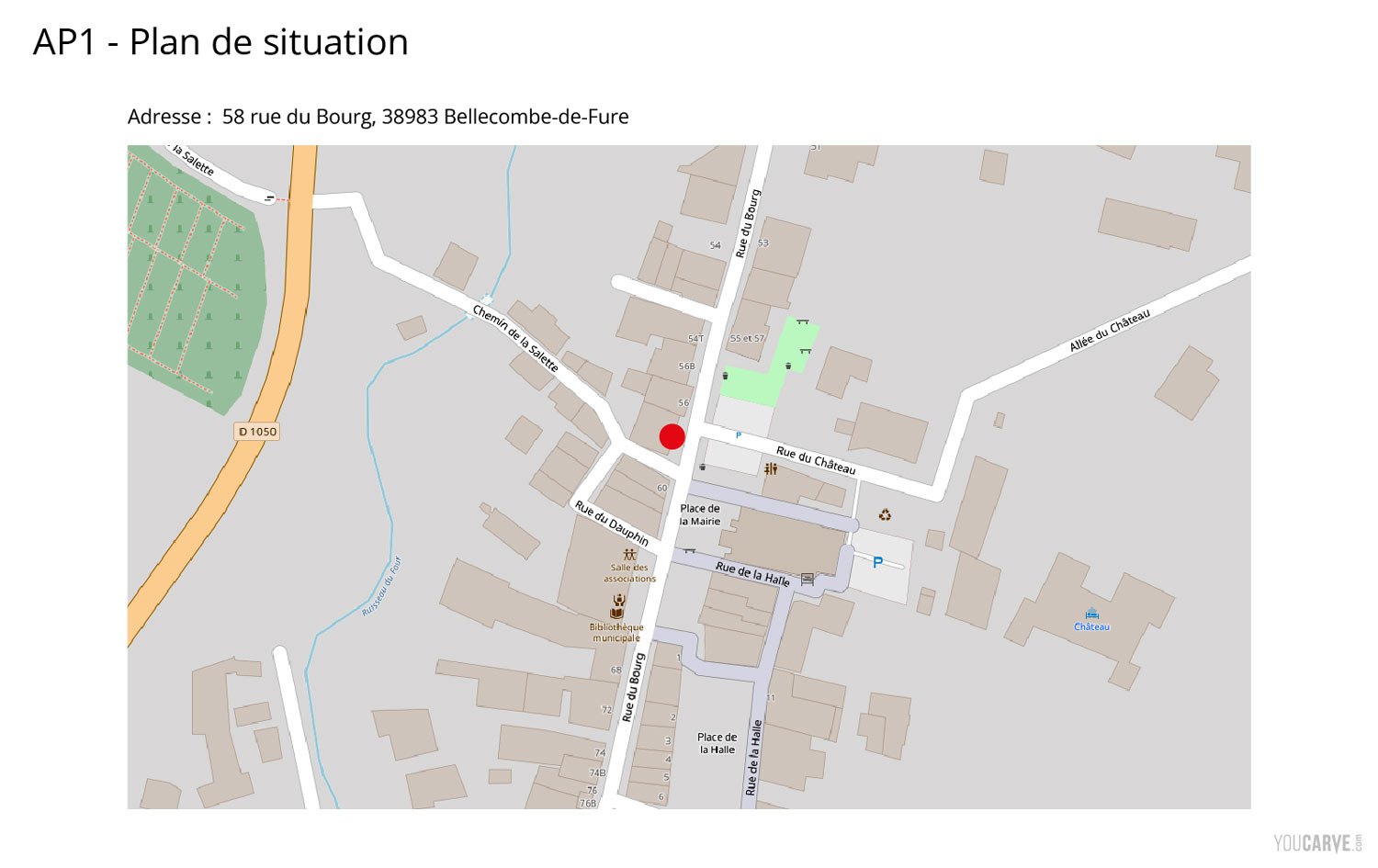
Example of supporting document AP1 for the fictional sign project « Le Fournil d'Anselme »
AP2 : Site plan (Plan de masse)
The site plan is a drawing representing a piece of land or a building seen from above, with the surrounding street.
If you have access to the original plans of the building, that's ideal. In this case, you will annotate the location of your sign with an arrow indicating the facade concerned.
Otherwise, a simple and generally tolerated solution is to retrieve a view of the building on the online land registry (cadastre) to use as a site plan. To do this, go to the Cadastre website and launch a search for your address. In the search results, choose the « Parcelle N°# » type view, which will show you a close-up view of the building. Take a screenshot on which you will add an arrow indicating the facade concerned by your sign.
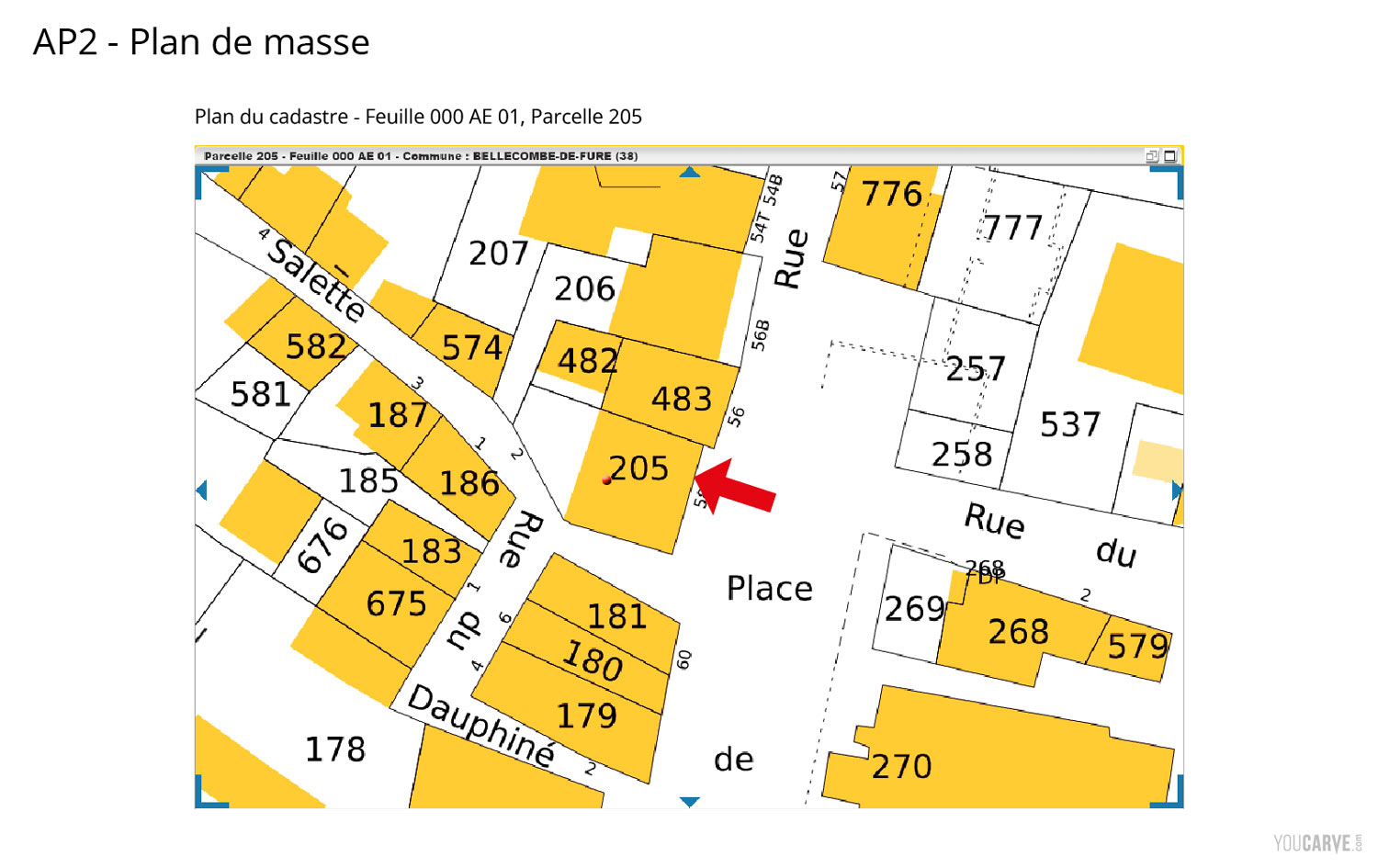
Example of supporting document AP2 for the fictional sign project « Le Fournil d'Anselme »
AP3 : Graphical representation of the sign dimensioned in three dimensions
One might think that it's mandatory to provide a 3D perspective view of the project, while in practice this is not necessarily what is expected. Of course, if you have the possibility to produce a 3D visual, it's a plus. But in most cases, the essential thing is above all to allow the urban planning department to clearly understand the volume of the sign in 3 dimensions: its width, height, and depth. A dimensioned front diagram, accompanied by a side view indicating the thickness or projection relative to the facade, generally allows for correctly meeting this requirement.
Even if it is not explicitly requested, write a brief description of your sign (material, color, planned fixation). You can also add an example photo showing a sign made with the same type of material/fixation. It is not required, but anything that can help the instructor better perceive your project will be welcome.
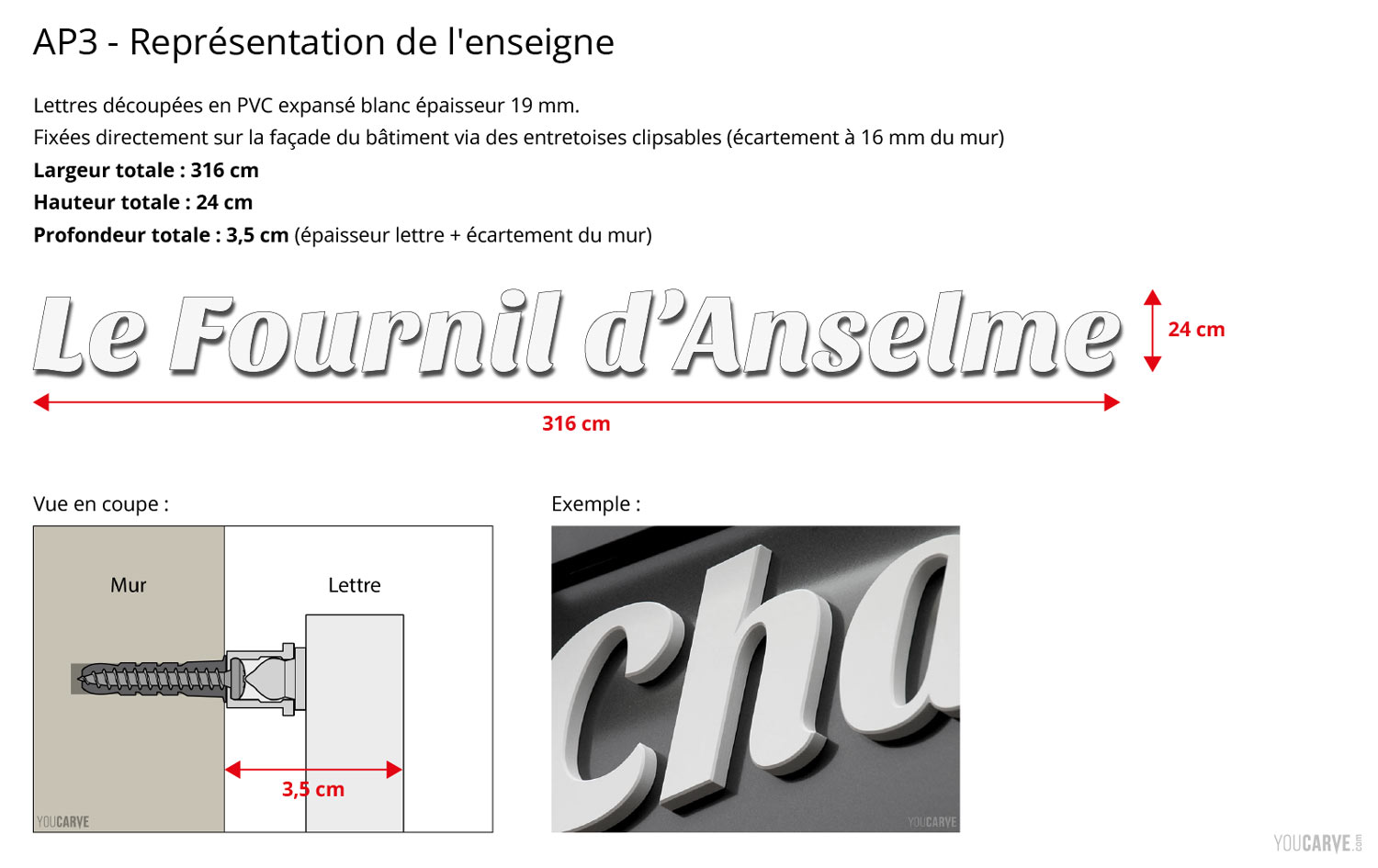
Example of supporting document AP3 for the fictional sign project « Le Fournil d'Anselme »
AP4 : Owner's agreement
This is a letter dated and signed by the owner of the premises (or their legal representative, in the case of a SCI for example) certifying that they authorize the installation of the sign on their building.
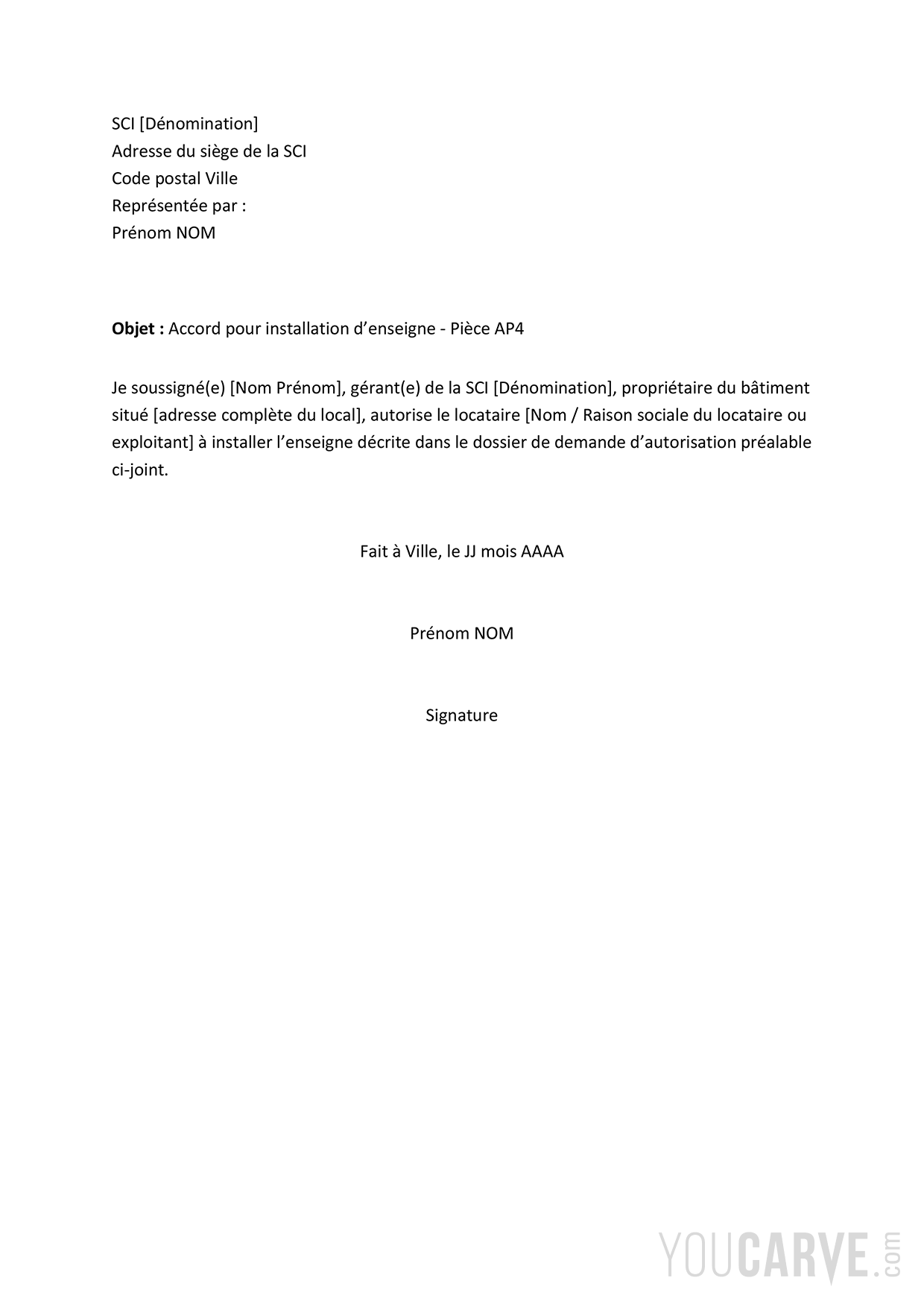
Download the owner's agreement letter template for a sign installation
Note: if you are the owner of the premises yourself, the simplest way is to write an attestation in your own name, confirming that you authorize the installation as the owner of the building.
AP5 : Mock-up of the sign in situation
This involves creating a photo montage simulating the look of the sign installed on the building. The simplest way is to photograph your storefront from the front and superimpose a mock-up of your lettering or sign while respecting proportions.
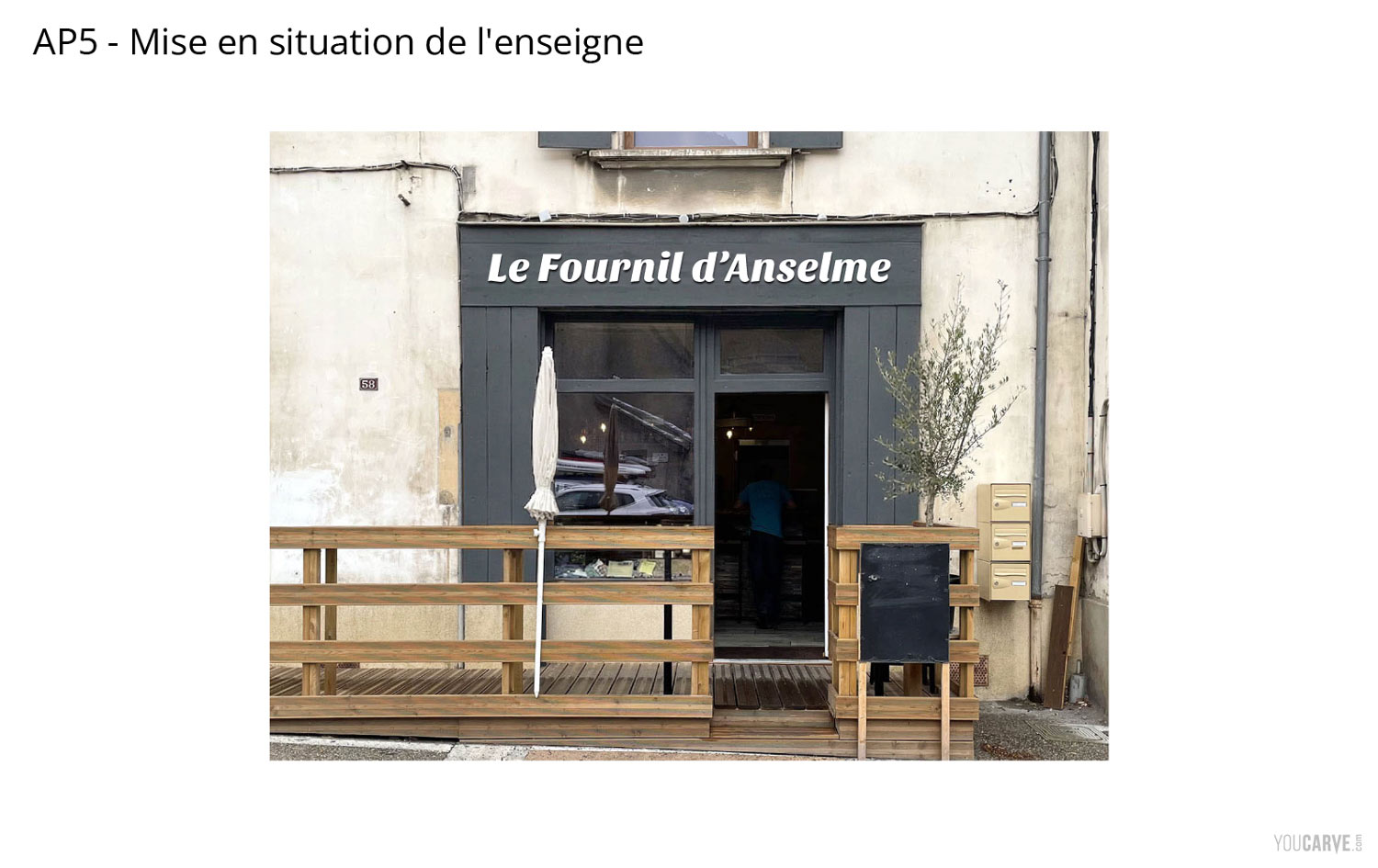
Example of supporting document AP5 for the fictional sign project « Le Fournil d'Anselme »
AP6 : Current view of the building (before/after or without/with the sign)
There is a certain redundancy regarding this document, being given that in AP5 the sign is already placed in situation. It is thus generally sufficient for AP6 to put only a photo of the current view with the same angle of view.
It's also a good opportunity to indicate on this view the dimensions of the facade, those that allowed you to calculate the commercial facade surface in section 4.5 of Cerfa 14798.
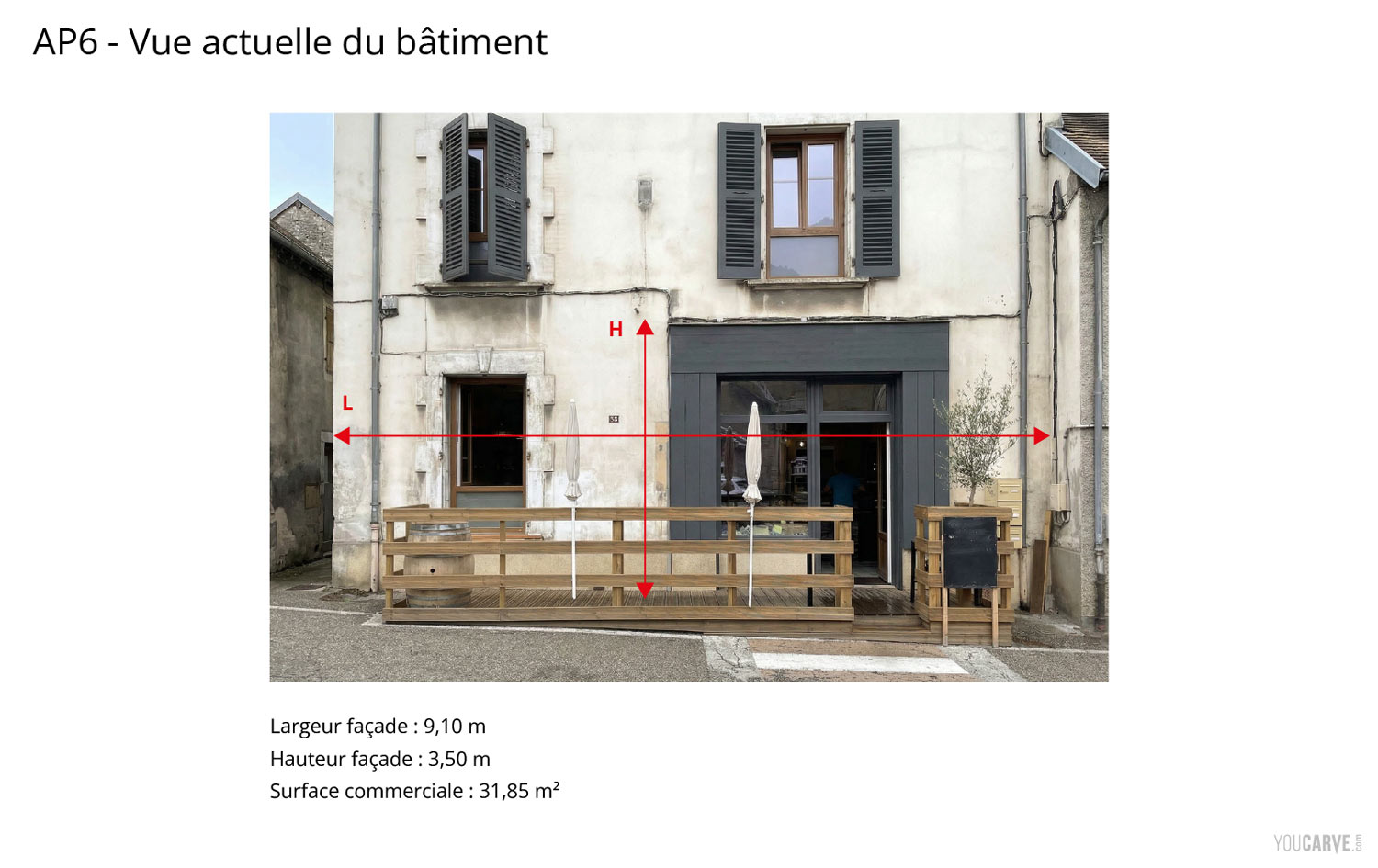
Example of supporting document AP6 for the fictional sign project « Le Fournil d'Anselme »
AP7 : Assessment of its integration into the environment
This supporting document aims to show the location of the shop concerned by the sign in a wider context, in order to better appreciate its integration relative to neighboring buildings and its environment.
- If your premises are located on a street, photos taken from a 3/4 view in each direction will generally suffice.
- If it is located in a square or a shopping area, it will be preferable to provide a more distant view showing the entire surrounding environment.
It is generally not mandatory to simulate the sign on these photos.
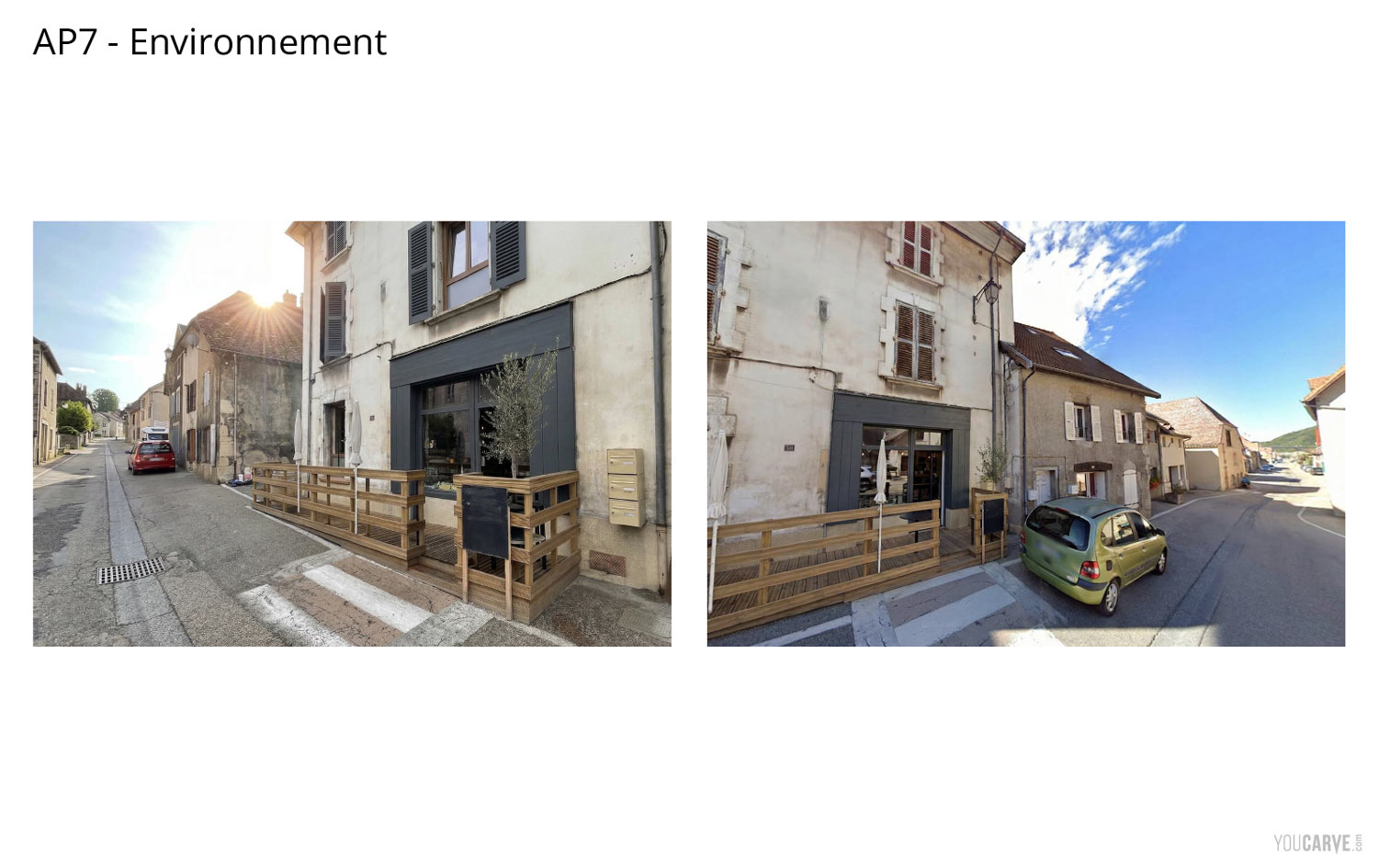
Example of supporting document AP7 for the fictional sign project « Le Fournil d'Anselme »
The cover letter
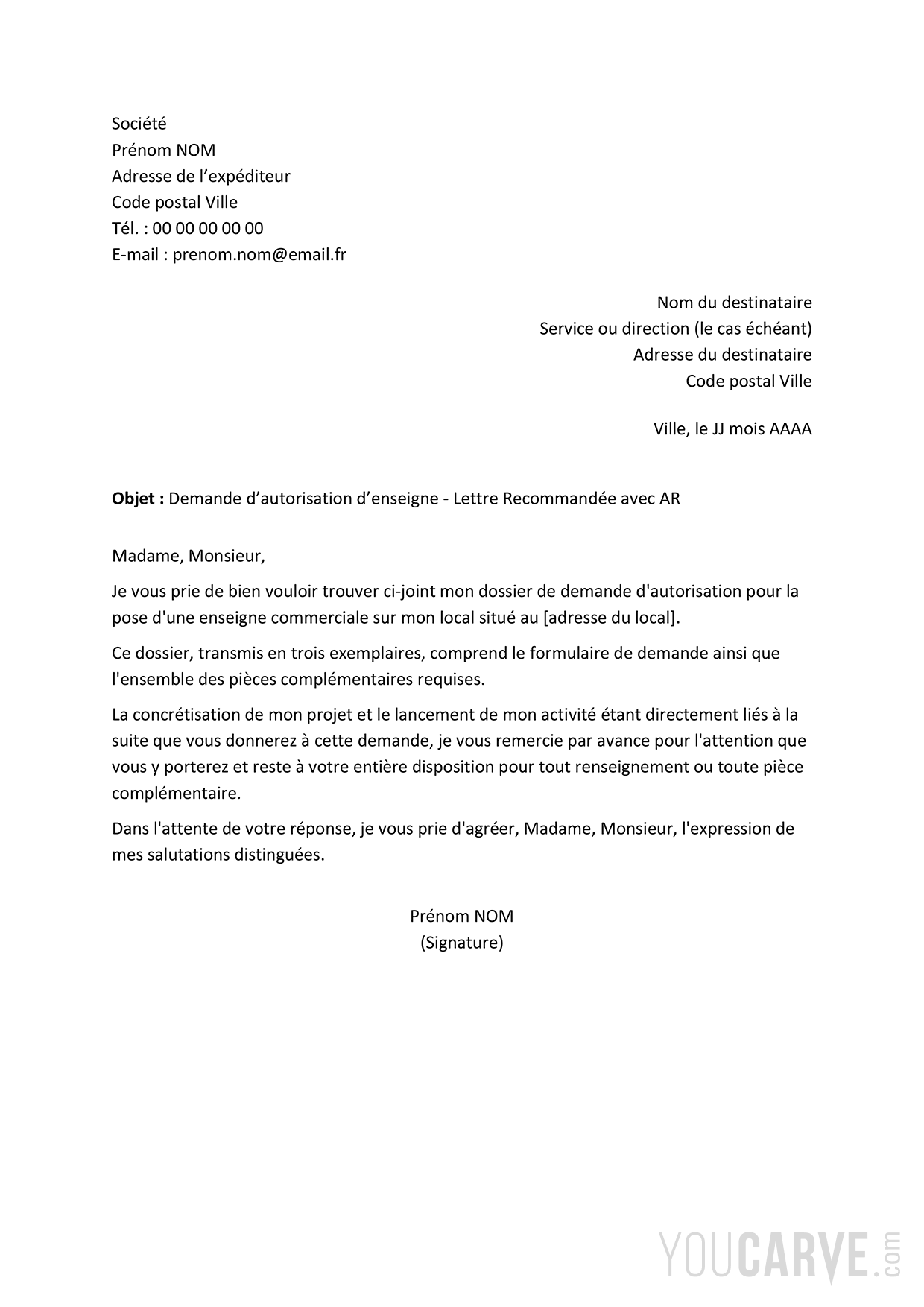
This is an optional element, but we recommend it because it makes the request a little less impersonal. It provides context and reminds that beyond the administrative form, there is a person, a company, and a real project. It is also a way of showing that one does not just send a raw file and demonstrates a certain consideration for the instructing service. Without seeking to “seduce” the administration, this helps to establish a more courteous and favorable exchange.
6 - How to send your file?
You will imperatively need to prepare 3 complete copies of your file (Cerfa form + attachments + cover letter, everything 3 times)
Send your file by registered mail
This is the classic and legally safest way. You send your 3 complete copies by Registered Letter with Acknowledgment of Receipt (RAR).
In addition to the Postal Acknowledgment of Receipt, the town hall is then required to send you a deposit receipt (according to the template presented on the last page of Cerfa 14798) confirming the official date of taking charge of your file.
Hand deliver your file
You can also physically go to the town hall with your 3 copies. In the best-case scenario, the reception service will be able to complete and stamp the deposit receipt template (available on the last page of Cerfa 14798)
And transmission by electronic means?
It is conceivable when the municipality has an adapted teleservice, but rare are the town halls that have set up this type of process. You can also, in theory, use an electronic registered letter service (LRE). However, to avoid any difficulty in processing your request, it is preferable to inquire beforehand with your town hall to check that it is used to receiving files by this means.
What is certain : a simple email with the documents as attachments is not enough.
7 – Deadlines for a signage authorization request file
From the moment you have deposited your file :
- The town hall has a maximum period of 2 months to provide you with a firm response (refusal or acceptance). If you have no response beyond this period, the authorization is considered tacit, but this scenario is quite rare, and betting on it is not prudent. What is more common, however, is that the town hall exploits the totality of this period to process your request.
- The town hall also has a period of 1 month to request any supporting documents if it judges that your file is incomplete. In this case, the response period will restart for 2 months from the moment you transmit the new documents.
Recommendation: 1 to 2 weeks after having deposited your file, recontact the service in charge of authorization requests and ask them if they have correctly received your file, if it is indeed being processed, and above all if they judge it complete or if they need supporting documents. In case of an incomplete file, this will save you time, and in any case, a call will help advance your request.
8 – Acceptance of the file
How do I know if my project has been accepted?
When the town hall has validated the conformity of your project, it will send you a « Favorable Order » (Arrêté favorable) : it is an official letter from the municipality announcing to you in writing the decision by which your sign project is authorized. From there, congratulations, you can calmly move on to the production and installation of your sign!
And if I haven't received a response?
If, on the other hand, you have never received a response beyond the 2-month regulatory period, (which remains quite rare), authorization is deemed granted and you are free to install your sign. Keep the postal AR and the receipt carefully, as they are what will allow you to prove the tacit authorization if necessary.
9 – Refusal of the file
How do I know if my project has been refused?
As with an acceptance, a refusal cannot be expressed lightly, orally or by a simple email. It must be the subject of a “refusal order”, i.e., an official document specifying that your sign project is refused as is and indicating the reasons for this decision.
There was a time when regulations were still quite vague, both for merchants and for the administration. One could then see appear, on one hand, totally disproportionate or aesthetically inconsistent sign projects, and on the other hand, sometimes arbitrary administrative opinions, based more on the instructor's personal assessment than on truly objective criteria. Fortunately, this period is largely behind us. Today, even if some exceptions can still exist, urban planning services generally have a clearer and more constructive approach in processing requests.
What to do in case of refusal?
If the refusal is clearly reasoned, no choice : it will have to review and adapt your project to make it compliant with the regulations. The problem can be purely technical (non-compliance with regulatory dimensions, non-compliance with a particular point of the RLP concerning a color or a material) and can be easily resolved by correcting the project.
Do not hesitate to make an appointment with the instructing service at the town hall to understand exactly what is blocking and to ensure that once modified, the file you resubmit will be accepted.
If the refusal is linked to an unfavorable opinion from the ABF (Architecte des Bâtiments de France)
In the case where your premises are located within the visibility range of a historical monument, in a safeguarded sector or a heritage zone, authorization is granted after a binding opinion from the Architect of the Buildings of France, whose opinion is imposed on the municipality. The ABF can refuse for aesthetic reasons (too bright colors, unsuitable materials, illuminated sign deemed incompatible with the character of the place...).
Ask then to be put in contact with the Architect of the Buildings of France so that they can explain to you what is precisely authorized in the specific configuration of your premises.
If you feel the refusal is arbitrary or abusive
You can first request an informal appeal (recours gracieux) from the mayor, within 2 months from the notification of the refusal. It is a request for re-examination, sent by registered mail with acknowledgment of receipt, in which you set out your arguments.
If this step does not succeed, you can consider a contentious appeal before the administrative court. The judge will check if the refusal is legally founded, correctly motivated, and proportionate. In this case, accompaniment by a lawyer is often preferable.
Finally, when the refusal is based on an unfavorable opinion from the ABF, there is also a specific appeal route allowing for a re-examination at the prefectural and regional level.
We think, however, that in most cases it remains preferable for your business to agree to modify the project rather than engage in a long, costly, and uncertain procedure. A contentious appeal can last more than a year and cost a lot in lawyer fees, and during this time you have no sign, whereas resubmitting an adjusted file only takes 2 months of instruction.
10 – Summary and recap
Essential points to remember :
The RLP (Local Advertising Regulation) or RLPi (for intermunicipal RLP) is a document from your municipality that defines the rules applicable for a sign project.
In the absence of an RLP, it is the RNP (National Advertising Regulation) that applies.
It is mandatory to file an authorization request before any installation of a new sign, in order to respect the regulations in force in your municipality and to avoid difficulties after the opening of the business.
There is no perfect or infallible method for completing your authorization request file, the essential thing is to describe your project honestly and completely.
Summary of the main steps for a signage authorization request :
- Identify and contact the service in charge of authorization requests for your premises
- Consult the RLP / RLPi of the municipality to become aware of the main rules to respect for your sign project
- Complete the Cerfa 14798 form
- Prepare the supporting documents (plans, mock-up, letter…)
- Transmit 3 copies of the whole set to the town hall of the municipality where the sign is located.
- Wait to have received the order from the town hall (maximum 2-month period) before installing your sign.
Summary of our examples and document templates :
- Our completed and commented example for our fictional project « Le Fournil d'Anselme » in PDF format
- Our example supporting documents file for our fictional project « Le Fournil d'Anselme » (PDF)
- Our owner's agreement letter template for a sign installation
- Our cover letter template for a sign authorization request
Summary of the main acronyms you might encounter :
- ABF : Architectes des Bâtiments de France (Architects of the Buildings of France)
- DAE / DAP : Demande d’Autorisation d’Enseigne / Demande d’Autorisation Préalable (Signage Authorization Request / Prior Authorization Request)
- PLU : Plan Local d'Urbanisme (Local Urban Plan)
- RAR : Recommandé avec Accusé de Réception (Registered with Acknowledgment of Receipt)
- RLP / RLPi : Règlement Local de Publicité / Règlement Local de Publicité Intercommunal (Local / Intermunicipal Advertising Regulation)
- RNP : Règlement National de Publicité (National Advertising Regulation)
- TLPE : Taxe Locale sur la Publicité et les Enseignes (Local Tax on Advertising and Signs)
Conclusion
As you will have understood, the signage authorization request is an unavoidable step, sometimes a bit tedious, but it remains quite accessible with a minimum of preparation and some good practices. We hope this guide has given you clear pointers to approach this process more serenely.